The ColorOS 16 update is built on Android 16. The update is almost finished rolling out now in March 2026. It started back in November 2025 with the big flagship phones. If your OPPO phone can get the update, it might already have it or will get it very soon.
The newest phones, like the OPPO Find X9 and Find X9 Pro come with ColorOS 16 already installed. For other phones, the update depends on where you live, your carrier, and the exact phone model. Let’s check out all the details:
OPPO ColorOS 16 Release Date And Rollout
- November 2025 (mostly done): Big flagship phones got the update first. It had OPPO Find N5, Find N3, Find N3 Flip, Find X8 Pro, Find X8, Reno14 series, Reno13 series, and Pad 3 Pro.
- December 2025 (finished): Phones like Find N2 Flip, Reno13 F (4G too), K13 Turbo Pro 5G, K13 Turbo 5G, and similar Turbo models got updated.
- Q1 2026 (now happening, March is the finale): Older Reno, F, K series phones, and tablets are getting it.
March 2026 schedule for mid-range phones:
- March 5, 2026: F31 Pro+ 5G, F31 Pro 5G
- March 6, 2026: K13x 5G
- March 10, 2026: Reno12 F, Reno12 FS, Reno11 FS, K12x 5G
- March 17, 2026: F31 5G
Other phones like Find X5 Pro, Reno12 Pro/5G, Reno11 Pro/5G, F-series (F31, F29 Pro, F27 Pro+), K13 5G, and pads have been getting updates since January/February.
If your phone is older, it probably won’t get ColorOS 16 because OPPO usually gives 3 to 4 years of major updates.
Also Read: Top 6 Features of OriginOS 6 That Make It a Game Changer
Key OPPO ColorOS 16 Features
Checking out Oppo’s ColorOS 16 nature, we can say the essence is all about “Smart & Smooth” performance. So expect multitasking to be easier, support content creation, and faster everyday tasks. If you value AI integration and fluidity over stock Android, this could be your sign to get an Oppo device with ColorOS 16.
Let’s get a bit more into the details.
ColorOS Gets Gemini AI
OPPO and Google have teamed up to bring smarter, more personal, and more secure AI features to OPPO phones. The new Mind Space + Gemini integration lets users save anything on their screen with a swipe and then ask Gemini to organise it or turn it into tasks, like planning trips or creating notes. Gemini can also help with live camera guidance and advanced photo editing using Nano Banana. All data stays private through OPPO’s secure AI system. These features debut on the OPPO Find X9 Series with a free 3-month Google AI Pro subscription.
Performance And Fluidity
Oppo has focused on making interactions feel instantaneous. ColorOS 15’s Parallel Animation is again present on this one, but slightly upgraded. The ColorOS 16 introduces Parallel Animation. Here, gestures and app transitions flow naturally from your touch point.
There are some key tech behind it, like:
- Luminous Rendering Engine: Renders visuals in parallel for lag-free animations.
- Trinity Engine: Optimises resources for gaming and heavy tasks.
- Tide Engine: Reduces power use (by 13%) and lowers temperature (by 4.1°C).
Overall, we get faster boot times, smoother app launches and scrolling, and quicker tap responses.
AI Enhancements
Agree or not, AI has given a big push. Integrating tools that save time and enhance productivity? Bring it on! It’s going to be perfect if you are using your phone for work or creative tasks.
- AI One-Tap Flash Note: Captures and organises notes from documents, videos, or bills. Also, summarises videos into chapters and automates expense tracking.
- Xiaobu AI Assistant: Offers personalised briefings (weather, tasks, news). Suggestions based on your habits, real-scene dialogues via voice/gestures. Gives portrait lighting for better photos.
- Productivity suite: AI Recording for transcriptions, AI Writing for drafts (emails, docs), AI Notes for templates. There’s handwriting conversion, and AI Calendar for task timelines too.
- AI LinkBoost: Your phone now understands when your network is weak and automatically boosts your connection using AI. You get smoother streaming, faster browsing, less lag while gaming, and more reliable internet when you’re travelling or in low-signal areas.
- Adjustable Clock Size on Home & Lock Screen: You can now change the size of the clock on select Flux themes. In this, you can personalise your screen to match your style.
- AI One-Tap Straightening for Tilted Photos: AI Automatic Straightening fixes tilted or crooked photos instantly. No need to adjust manually, get clean, perfectly aligned pictures with one tap.
- AI Writer: Generates emails, captions, spreadsheets across apps.
- AI Mind Space: Scans posters via camera for calendar adds.
Also, you can find some resemblance with how Google’s Gemini integrates. Only that this one is tailored to Oppo’s ecosystem.
UI & Customisation
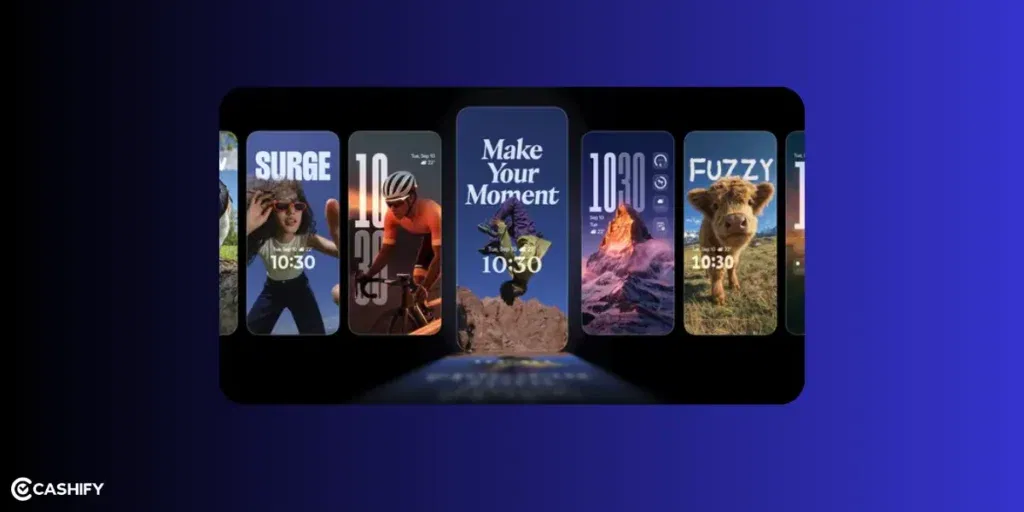
UI and the openness to customisation tell a lot about an OS. The ColorOS 16 is inspired by natural light and shadows. The design uses gradients, halos, and glows for a clean, intuitive look.
These are the standouts:
- Flux Home Screen: Resize icons, folders, and cards dynamically. The layout adapts with fluid animations.
- Full-Screen AOD: View your wallpaper with key info on the always-on display.
- Personalisation: AI-generated themes, animated wallpapers from static images, and auto-matching icon colours.
- New Weather Widgets for Instant Information: Two new Home Screen widgets are available:
- Sunrise/Sunset widget.
- Weather + UV Index combined widget.
- Visual/UI additions: Aqua Dynamics or similar fluid effects, more animated wallpapers, and Material 3 Expressive-inspired elements.
If you love experimenting with your phone’s appearance, these options provide more flexibility than many other competitors.
Photo And Video Editing
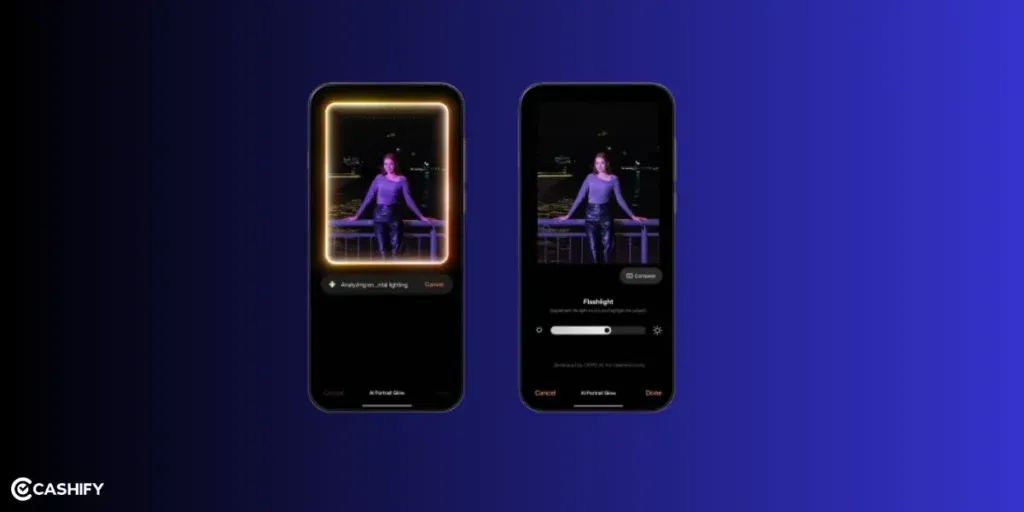
For people interested in photography, ColorOS 16 upgrades the Photos app with:
- AI Portrait Glow: Enhances low-light portraits by optimising skin tones.
- Other AI tools: Eraser, Unblur, and Reflection Remover.
- Video editing: Master Cut for trimming, music, filters, and adjustments.
Cross-Device Connectivity
Seamless integration across ecosystems is a highlight:
- O+ Connect: Manage files and remote control between phone, Mac, or Windows PC.
- Screen Mirroring: Cast up to five apps and control with a mouse/keyboard.
- One-Tap Share: Transfer docs, notes, and more, including health data from Apple Watch.
Expanded Cross-Device Connectivity:
O+ Connect for seamless file sharing, app mirroring (up to 5 apps), and remote control with Mac/Windows/PC (including support for some third-party ecosystems like Apple Watch health data sharing).
New AI Tools:
AI Dynamic Depth for wallpapers, enhanced Fluid Cloud with live updates, Master Cut video editor (trimming, music, filters), and chip-level optimizations for consistent performance on budget devices (Project Breeze-like features).
Other perks include floating windows for multitasking, a customisable control center, vehicle integration, and PC-level WPS Office.
So, according to me, what users will love in ColorOS 16 is:
- Better AI tools
- Cleaner interface
- Improved smoothness
- Better photo editing
- Improved animations
ColorOS 16 Eligible Devices
Let us now take a look at the ColorOS 16 eligible devices:
| Series | Eligible Devices |
| Find X Series | Find X9, Find X9 Pro, Find X8, Find X8 Pro, Find X8 Ultra, Find X7, Find X7 Ultra, Find X5 Pro |
| Find N Series | Find N6, Find N5, Find N5 Flip, Find N3, Find N3 Flip, Find N2 Flip (selected models) |
| Reno 15 Series | Reno 15 Series |
| Reno 14 Series | Reno 14, Reno 14 Pro, Reno 14 Pro+, Reno 14 F, Reno 14 Diwali Edition |
| Reno 13 Series | Reno 13, Reno 13 Pro, Reno 13 F, Reno 13 F 4G |
| Reno 12 Series | Reno 12, Reno 12 Pro, Reno 12 F, Reno 12 FS, Reno 12 F Harry Potter Edition |
| Reno 11 Series | Reno 11, Reno 11 Pro, Reno 11 F |
| Reno 10 Series | Reno 10 Pro+ |
| F Series | F31, F31 Pro, F31 Pro+, F29, F29 Pro, F27, F27 Pro+ |
| K Series | K13, K13 Turbo, K13 Turbo Pro, K13x, K12, K12 Plus, K12s, K12x |
| A Series | A6 Pro, A98, A78, A5, A5x, A5 Pro |
ColorOS 16 Vs ColorOS 15
A lot of users question whether it’s worth upgrading to the next OS update when the current one isn’t that old. If you, too, have the same confusion here, check out the differences in ColorOS 16 and its predecessor, ColorOS 15:
| Aspect | ColorOS 16 | ColorOS 15 |
|---|---|---|
| Base Android | Android 16 | Android 15 |
| Animation | Seamless Animation (touch-point flows, Luminous Engine) | Parallel Animation (smooth transitions) |
| AI Features | AI One-Tap Flash Note, Xiaobu (Briefing, Dialogue, Lighting), AI Writing/Notes/Calendar | AI Editor (Clarity, Eraser), AI Toolbox, Gemini Integration |
| UI Customisation | Flux Home Screen, Full-Screen AOD, AI themes | Aesthetic upgrades, smoother icons/widgets |
| Performance | Tide Engine (13% less power), Project Breeze for entry-level | Snappy responsiveness, fluid multitasking |
| Cross-Device | O+ Connect (Mac/Windows), 5-app mirroring | Touch to Share (iOS), basic multitasking |
| Photo/Video | AI Portrait Glow, Master Cut | AI Eraser/Unblur, basic editing |
| Privacy Features | Standard | Stronger privacy controls |
| Multitasking | Good | Better floating window support |
If you have ColorOS 15, the upgrade is worthwhile for deeper AI and efficiency gains, especially on older hardware.
Check If The ColorOS 16 Update is Available
Here is how you can check whether the ColorOS 16 update is available.
- Go to Settings -> Click on About Device
- Choose ColorOS Version -> Check for Updates
- Download and install if it is available.
How to Join ColorOS16 Beta Program?
Generally, many users want early access. If you’re one of them, you need to follow the steps.
- Open Settings -> Go to About Device
- Click on Trial Version / Beta Program
- Apply for the Beta Update
- Wait for Approval
Beta updates may have bugs, so it is better for advanced users.
In The End
So, here is the quick summary about ColorOS 16.
| Category | Details |
| Best Upgrade | AI tools + performance |
| Best Feature | Smart multitasking + UI design |
| Rollout Type | Gradual rollout by region |
| Recommended Devices | Find & Reno series first. |
| Best For | Oppo users who want customisation |
ColorOS 16 is the kind of freshness every Oppo user has been waiting for. It blends performance, AI tools, and customisation in more than subtle ways. That makes it a compelling choice for new buyers or upgraders. If you’re in the market for a smartphone, consider models like the Find X9 for the full experience. Or update your existing device to extend its lifespan. Stay tuned to this space to know more details regarding eligible devices.
FAQ On Oppo ColorOS 16
1. When will OPPO release ColorOS 16?
ColorOS 16 has begun to roll out from November 2025, beginning with flagship OPPO devices.
2. Which OPPO phones will get ColorOS 16?
The update has first come to the Find X9 Series, followed by recent Find, Reno, and F-series models.
3. What are the main new features in ColorOS 16?
It includes Mind Space integration with Google Gemini, better AI privacy, improved image editing, and upgraded AI tools like AI Writer and AI Calls.
4. How does ColorOS 16 improve AI features?
It connects OPPO apps with Google Gemini, letting users organize content, get suggestions, edit images, and perform tasks using AI more intelligently.
5. Is ColorOS 16 safe for personal data?
Yes. It uses OPPO AI Private Computing Cloud with Google Cloud’s secure technology to keep your data encrypted and private.
6. Do Find X9 users get any benefits with ColorOS 16?
Yes. Find X9 buyers get a 3-month Google AI Pro subscription, offering access to premium Gemini features and 2TB cloud storage.
7. What is ColorOS 16?
ColorOS 16 is Oppo’s latest software update. It is based on Android 16 and brings improved speed, new AI features, and a fresh design.
8. Is ColorOS 16 based on Android 16?
Yes, ColorOS 16 is built on Android 16 and includes all the latest Android improvements along with Oppo’s custom features.
9. Which Oppo phones will get ColorOS 16?
Most recent Oppo flagship and mid-range phones are eligible. Older or budget models may not receive the update.
10. When will ColorOS 16 be available in India?
The update will roll out in phases.
Flagship phones will get it first, followed by mid-range models. Some users may need to wait a few weeks.
Buying refurbished mobile phones was never this easy. Sell your old phone and get exclusive offers & discounts on refurbished mobiles. Every refurbished phone is put through 32-point quality checks to ensure like-new standards and comes with a six-month warranty and 15-day refund. Buy refurbished phone easily on no-cost EMI today!