Finding the right PUBG sensitivity code can make a noticeable difference when you’re trying to improve your aim, recoil control, and movement. The same goes for Fortnite, where your sensitivity settings can affect how quickly you turn, track enemies, and build during intense fights. However, copying a random setup does not always give you the results you expect, as your device, controls, and playing style also matter.
In this blog, you’ll learn how to adjust PUBG sensitivity settings and use a sensitivity code correctly. You’ll also find the key Fortnite settings you can tweak to make aiming and movement feel more comfortable. Whether you’re a beginner or looking to fine-tune your current setup, these changes can help you create controls that feel more natural. So, let’s get started.
TL;DR
- Sensitivity settings affect your aim, recoil control, and movement.
- PUBG Mobile allows you to share and import sensitivity codes.
- Fortnite lets you customize sensitivity manually across different controls.
- The best sensitivity depends on your device, playstyle, and preferences.
- Use sensitivity codes as a starting point, not a final solution.
- Test changes gradually instead of making large adjustments all at once.
Also Read: Best Guns in Battlegrounds Mobile India (BGMI) to Always Win Gunfights
What Is Sensitivity in PUBG Mobile and Fortnite?
Before you start adjusting anything, you need to understand what sensitivity actually means.
In simple terms, sensitivity controls how fast your camera or aim moves when you swipe your screen or move your mouse.
- Low sensitivity: Slower movement, better control
- High sensitivity: Faster movement, quicker reactions
The goal is to find a balance where you can:
- Turn quickly when needed
- Control recoil easily
- Aim accurately without overshooting
What Is a PUBG Sensitivity Code?
A PUBG sensitivity code is a shareable configuration code that can be used to apply another player’s sensitivity settings in PUBG or PUBG Mobile, depending on the version of the game you are using. These settings can control how quickly your camera, aim, and scope respond when you move your finger, mouse, or controller.
Sensitivity is important because it directly affects how you move your crosshair. A setting that is too high can make small movements feel exaggerated, while a very low setting can make it harder to turn quickly when an opponent appears beside you.
You may see players sharing sensitivity codes online with their recommended camera, ADS, gyroscope, or other control settings. These can be useful as a starting point, but you should not assume that the same configuration will work perfectly for you.
Your screen size, touch response, frame rate, control layout, and personal habits can all change how a sensitivity setting feels.
Why Do Sensitivity Settings Matter In PUBG and Fortnite?
Sensitivity is one of the most important gameplay settings because it directly affects how quickly and accurately you can respond.
1. Improves Aim Accuracy
Your sensitivity decides how much your crosshair moves with each swipe. If your sensitivity is too high, you may overshoot enemies. If it is too low, you may struggle to track fast-moving opponents.
A balanced setting helps you maintain accuracy in both close and long-range fights.
2. Helps Control Recoil
Weapons such as the M416, AKM, and Beryl M762 have different recoil patterns. Proper ADS and gyroscope sensitivity allow you to pull down smoothly and keep your bullets closer to the target.
3. Improves Reaction Speed
Fast-paced games require quick movements. Higher sensitivity can help you turn faster during close combat, while lower sensitivity provides better precision for sniping and long-range shots.
The goal is not maximum speed, it is finding the right balance between speed and control.
Types Of Sensitivity Settings In PUBG Mobile
PUBG Mobile mainly has three sensitivity categories.
1. Camera Sensitivity
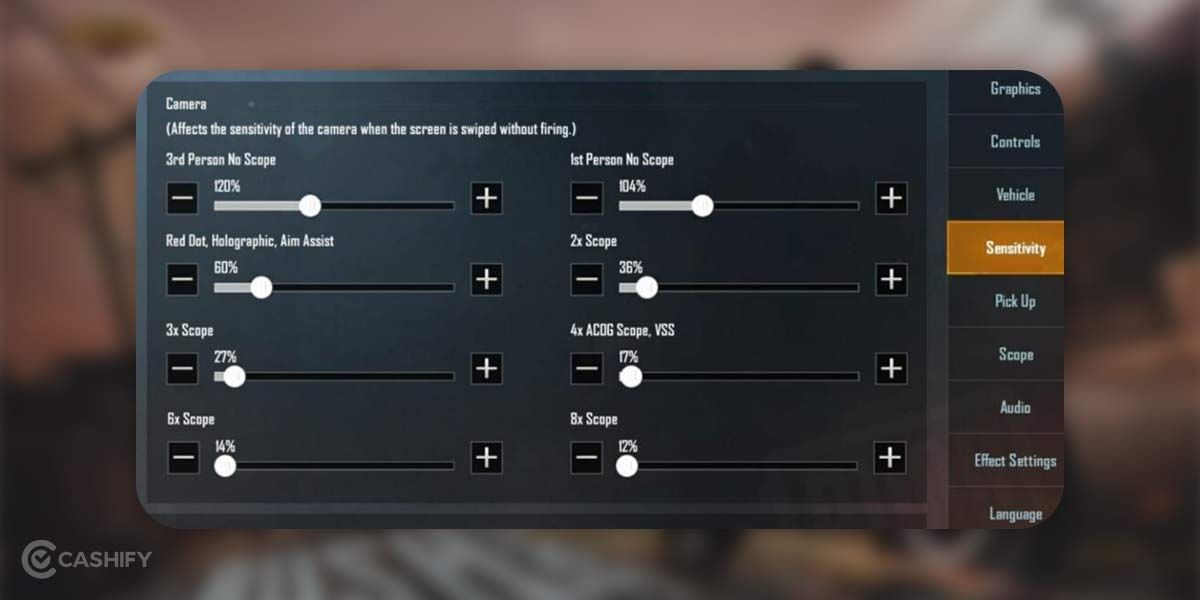
This controls how fast you look around without firing.
It affects:
- Free look movement
- Scope movement
- General camera turning speed
The player’s speed must look around in different directions in the game. Therefore, the default settings of TPP (Third Person Perspective) and FPP (First Person Perspective) camera pubg sensitivity settings may also work fine for many users. However, adjustments can be made as follows:
- Camera: 95-100 per cent
- TPP: 95-100 per cent
- FPP: 70-75 per cent
2. ADS Sensitivity
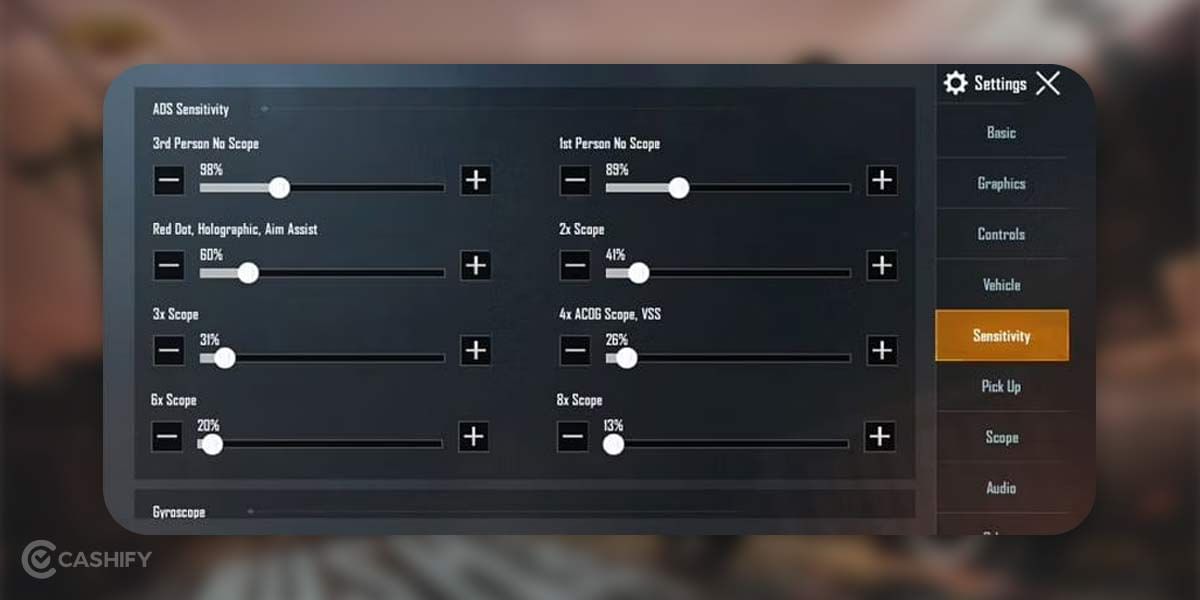
ADS means Aim Down Sight. This setting controls recoil movement while shooting. Higher ADS sensitivity helps pull recoil down faster.
| Setting | Recommended Range | Notes |
|---|---|---|
| TPP No Scope | 100–120% | Fast aiming without scopes. |
| FPP No Scope | 90–110% | Controlled first-person aiming. |
| Red Dot / Holographic / Aim Assist | 60–70% | Balances recoil and tracking. |
| 2x Scope | 50–60% | Helps manage mid-range recoil. |
| 3x Scope | 40–50% | Stable for controlled spray firing. |
| 4x Scope / VSS | 30–40% | Suitable for longer engagements. |
| 6x Scope | 20–25% | Precision control with minimal recoil. |
| 8x Scope | 15–20% | Best for sniper-level accuracy. |
3. Gyroscope Sensitivity
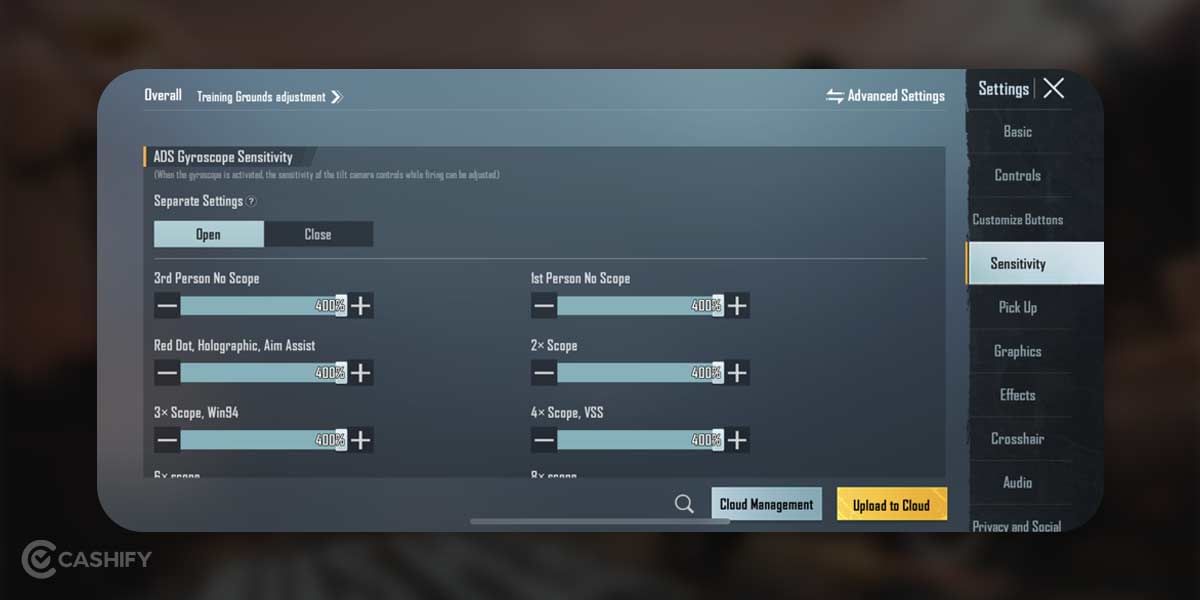
Gyroscope sensitivity allows you to aim by tilting your phone physically.
Many competitive players use gyroscope because it improves recoil control and aiming precision.
| Perspective / Scope | Gyroscope Sensitivity (%) |
|---|---|
| TPP (No Scope) | 95 to 100 |
| FPP (No Scope) | 95 to 100 |
| Red Dot / Holographic / Aim Assist | 90 to 95 |
| 2x Scope | 120 to 125 |
| 3x Scope | 60 to 65 |
| 4x Scope / VSS | 50 to 55 |
| 6x Scope | 40 to 45 |
| 8x Scope | 30 to 35 |
Best PUBG Sensitivity Code
You can try this balanced sensitivity code:
7307-1085-6780-4282-435
This setup works well for:
- Balanced recoil control
- Smooth camera movement
- Mid-range sprays
- Gyroscope aiming
How To Import PUBG Sensitivity Code
- Open PUBG Mobile.
- Go to Settings.
- Open Sensitivity.
- Tap Layout Management.
- Select Search Method.
- Enter the sensitivity code.
- Tap Preview.
- Confirm and apply.
After importing, always test settings in Training Ground first.
How To Adjust PUBG Sensitivity Settings?
Now that you know about the PUBG sensitivity codes, follow these simple steps to adjust the settings:
- Open PUBG Mobile or BGMI.
- Tap the Settings icon.
- Open the Sensitivity tab.
- Adjust:
- Camera Sensitivity
- ADS Sensitivity
- Gyroscope Sensitivity
- Test settings in Training Ground.
- Make small changes gradually,
Do not change everything at once. Test every setting properly before increasing or decreasing it.
Best Fortnite Sensitivity Settings
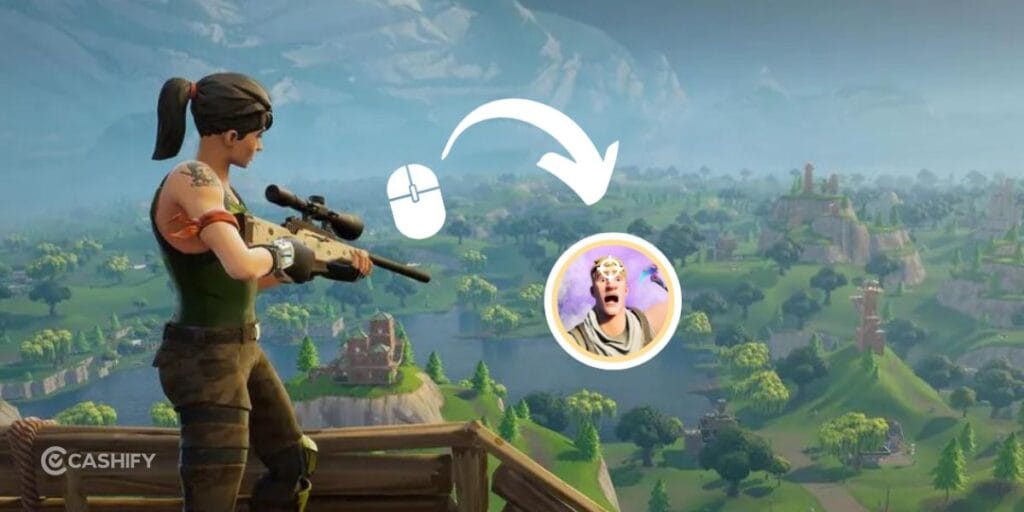
Fortnite sensitivity settings are slightly different because the game supports:
- Mouse & keyboard
- Controller
- Mobile controls
Best Fortnite Mouse Sensitivity
| Setting | Recommended Range | Notes |
| DPI | 400 – 800 | 800 is most common among pros |
| X Sensitivity | 6% – 9% | Lower = better aim |
| Y Sensitivity | 6% – 9% | Keep same as X for consistency |
| ADS (Targeting) | 35% – 60% | Lower for accuracy |
| Scope Sens | 35% – 50% | Sniper control |
| Build/Edit Multiplier | 100% | Faster building |
Best Fortnite Controller Settings
| Setting | Recommended Value | Notes |
| Look Sensitivity | 6 – 7 | Good speed/control balance |
| ADS Sensitivity | 3 – 5 | Helps with aim precision |
| Build Multiplier | 1.8× – 2.2× | Faster building |
| Edit Multiplier | 1.8× – 2.2× | Faster edits |
| Aim Assist | 100% | Keep on |
| Input Curve | Linear | Smooth control |
Fortnite requires a balance between aiming and fast building movement.
Fine-Tune Your Sensitivity Settings
Even the best PUBG sensitivity code may not work perfectly for everyone because sensitivity depends on your device, finger setup, and playstyle. Use sensitivity codes as a starting point and then make small adjustments based on comfort.
- Camera Sensitivity: Controls how fast you look around while moving. Keeping it around 120%–180% helps with smoother hip-fire movement and quick reactions.
- ADS Sensitivity: Helps control recoil while shooting. If your aim drifts upward during sprays, slightly increase ADS sensitivity for better recoil control.
- Gyroscope Sensitivity: Helps you aim and control recoil by tilting your phone. Higher gyro sensitivity improves tracking and spray accuracy during fights.
Always test changes in Training Ground before using them in ranked matches. Small adjustments usually work better than changing everything at once.
Best Sensitivity Tips For Better Aim
Now that you know about the PUBG sensitivity codes and Fortnite sensitivity codes, here is how you can make the best out of it:
Keep Crosshair At Head Level
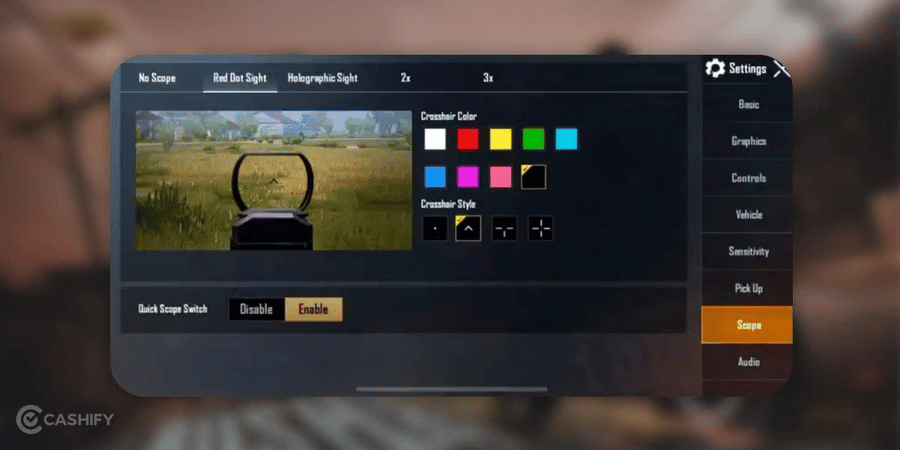
Always keep your aim near head height while moving. This improves reaction speed during fights.
Use Gyroscope If Possible
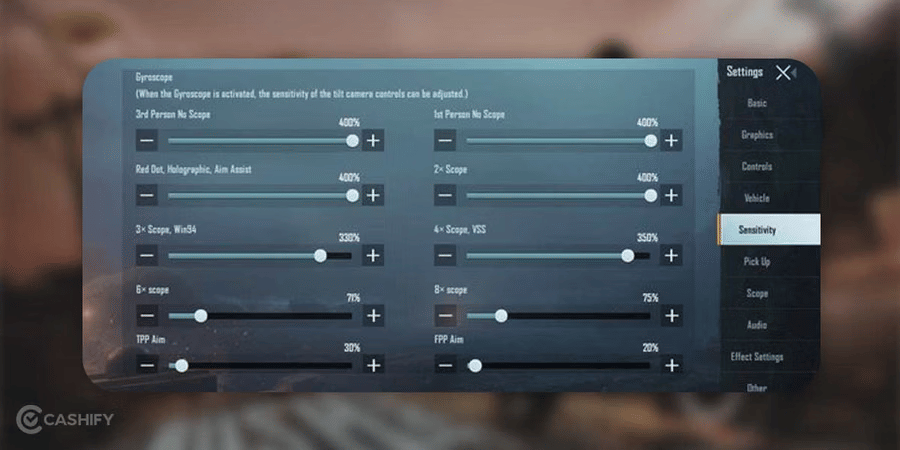
Gyroscope gives much better recoil control once you get used to it.
Practice Spray Control
Use weapons like:
- M416
- Scar-L
- AUG
These are easier to control while learning.
Use Attachments
Attachments like the Vertical Grip, Compensator and Half Grip help reduce recoil further.
Train Daily
Even 15 minutes of Training Ground practice improves aim significantly.
Best PUBG Sensitivity Tips For Low-End Vs High-End Devices
Your PUBG sensitivity settings should never be “one-size-fits-all” because your device plays a huge role in how the game feels.
- Low-end devices need lower sensitivity settings: If you are using a budget or low-end phone, your game may not run at very high FPS. In this case, lower to medium sensitivity works better because it gives you more control and reduces shaky aim during fights.
- Keep camera sensitivity moderate on low-end phones: Avoid very high camera sensitivity, as it can make movement feel unstable and harder to control in close-range battles.
- Avoid extremely high gyroscope settings on low-end devices: High gyro sensitivity can feel jittery on weaker phones, making recoil control more difficult.
- High-end devices support higher sensitivity settings: If you are using a 90Hz or 120Hz phone, the gameplay feels smoother and more responsive, allowing you to use higher sensitivity comfortably.
- Higher ADS sensitivity works better on flagship phones: You can increase ADS settings for faster recoil control and quicker target tracking in fast fights.
- Gyroscope performs best on high-end devices: Smooth motion tracking allows you to use higher gyro sensitivity for better precision and aggressive gameplay.
- Low-end devices focus on stability, high-end devices focus on speed: Budget phones should prioritize control, while powerful devices can handle fast movements and aggressive playstyles.
- Always test settings in training mode: Instead of copying PUBG sensitivity codes blindly, adjust based on your device and fine-tune until aiming feels natural and consistent.
What Is Zero Recoil Sensitivity In PUBG?
Zero recoil sensitivity in PUBG Mobile doesn’t literally remove recoil from your weapons. Instead, it refers to a well-optimized combination of Camera, ADS (Aim Down Sights), and Gyroscope settings that helps you control recoil more smoothly, especially during automatic weapon sprays, without needing excessive downward drag.
This is also why using someone else’s sensitivity code doesn’t always feel right. Factors like device size, frame rate consistency, and even how you hold your phone can significantly impact how your crosshair responds in actual gameplay
Best PUBG Mobile Zero Recoil Sensitivity Codes
Before applying any PUBG sensitivity code, it’s a good idea to save your current settings (e.g., take a screenshot) so you can revert if needed. Below are some useful presets you can try:
| Code Name | Code | Gyro / Non-Gyro | Best For |
| Balanced All-Rounder | 7307-1085-6780-4282-435 | Balanced | Most players |
| Tablet / iPad Baseline | 1-7478-5115-3389-3888-854 | Balanced | Larger screens |
| Gyro Stability | 1-7478-5115-3389-3888-855 | Gyro-leaning | Low-recoil sprays |
| Non-gyro Baseline | 1-7571-6708-4489-3563-702 | Non-gyro | Quick reset setup |
Quick Overview Of Best PUBG Sensitivity Code Settings
With this table, you’ll set the best settings in no time:
| Sensitivity Category | Setting | Recommended Range | Notes |
|---|---|---|---|
| Camera Sensitivity | TPP (3rd Person) No Scope | 95-100% | Fast turning for situational awareness |
| FPP (1st Person) No Scope | 70-75% | Slightly lower for precision in FPP | |
| Camera (General) | 95-100% | Balances speed and control | |
| Camera + Scope Settings | TPP No Scope | 95-100% | Quick movement in third-person |
| FPP No Scope | 85-90% | Responsive yet controlled | |
| Red Dot, Holographic | 50-55% | Good for close-range precision | |
| 2x Scope | 30-35% | Mid-range stability | |
| 3x Scope | 20-25% | Reduced sensitivity for accuracy | |
| 4x Scope, VSS | 15-18% | Fine-tuned for longer shots | |
| 6x Scope | 10-13% | Low sensitivity for distant targets | |
| 8x Scope | 10-13% | Maximum precision for sniping | |
| ADS Sensitivity | TPP No Scope | 95-100% | Fast aiming without scopes |
| FPP No Scope | 85-90% | Controlled aiming in first-person | |
| Red Dot, Holographic | 55-60% | Balances recoil and tracking | |
| 2x Scope | 37-42% | Slightly higher for mid-range | |
| 3x Scope | 30-35% | Recoil control for sprays | |
| 4x Scope, VSS | 25-30% | Stability for longer engagements | |
| 6x Scope | 20-23% | Precision with manageable recoil | |
| 8x Scope | 10-13% | Lowest for sniper accuracy | |
| Gyroscope Sensitivity | TPP No Scope | 95-100% | Quick tilt-based movement |
| FPP No Scope | 95-100% | Consistent with TPP for gyro users | |
| Red Dot, Holographic | 90-95% | Precise close-range aiming | |
| 2x Scope | 120-125% | Higher for faster mid-range adjustments | |
| 3x Scope | 60-65% | Balanced for accuracy and control | |
| 4x Scope, VSS | 50-55% | Stable for longer shots | |
| 6x Scope | 40-45% | Reduced for precision at distance | |
| 8x Scope | 30-35% | Fine-tuned for sniping with tilt | |
| ADS Gyroscope Sensitivity | TPP No Scope | 281% | High for aggressive gyro aiming |
| FPP No Scope | 286% | Slightly higher for FPP responsiveness | |
| Red Dot, Holographic | 301% | Maxed for close-range precision | |
| 2x Scope | 301% | Consistent with Red Dot for gyro | |
| 3x Scope, Win94 | 236% | Strong control for mid-range | |
| 4x Scope, VSS | 171% | Reduced for stability | |
| 6x Scope | 101% | Lower for long-range precision | |
| 8x Scope | 76% | Minimal for sniper shots |
Should You Use Someone Else’s Sensitivity Code?
This is important: copying a pro player’s PUBG sensitivity code won’t magically make you better.
Why?
Because sensitivity depends on:
- Your device (low-end or high-end)
- Screen size
- Finger control
- Whether you use gyro
So instead of blindly copying, you should:
- Use codes as a starting point
- Then adjust based on your comfort
Sensitivity Settings From Pro Players
If you want to get better at PUBG Mobile, you can try using the sensitivity settings used by top pro players. I have listed the settings and control styles of famous Indian players like Jonathan Gaming, ScoutOP, and Mortal. These settings will let you experience how they play. The good thing is, you can adjust them to fit your own style.
Jonathan
Jonathan is known for playing aggressively. He uses a 4-finger claw setup with high gyroscope sensitivity. It helps him handle close fights and control his gun’s recoil really well.
| Setting | Sensitivity (%) | Purpose |
|---|---|---|
| Camera Sensitivity (TPP No Scope) | 95–100 | Quick turns and awareness |
| Camera Sensitivity (FPP No Scope) | 70–75 | Smooth first-person view movement |
| ADS Gyroscope (Red Dot) | 300 | Fast, accurate aiming |
| ADS Gyroscope (3x Scope) | 236 | Balanced recoil control mid-range |
| Gyroscope (Red Dot) | 90–95 | Smooth aiming with device movement |
| Control Style | 4-finger claw + gyro on | Helps aim and control recoil |
His high gyroscope sensitivity helps him aim better and land headshots. The camera settings keep his movement smooth and fast.
ScoutOP
Let’s check out about ScoutOP Sensitivity Settings:
| Category | Details |
|---|---|
| Playstyle | Uses thumbs to move and gyroscope to aim. It is good for close and mid fights. |
| Camera Sensitivity | TPP No Scope: 90–95%. Fast but still under control. FPP No Scope: 85–90%. Smooth camera movement. |
| ADS Sensitivity | Red Dot: 55–60%. Helps track enemies up close. 3x Scope: 30–35%. Good for aiming at enemies from a distance. |
| Gyroscope Sensitivity | 3x Scope: 60–65%. Helps aim better by tilting the phone. |
| Control Style | Uses thumbs for movement and gyroscope for aiming. |
He has a good balance of speed and control. It is great for players learning gyroscope.
Note To Improve Aim In PUBG
When you play PUBG Mobile or BGMI, gyroscope and touch controls can feel different on each phone. That’s why finding the best sensitivity for PUBG Mobile is super important. You can try your PUBG sensitivity settings by playing unranked matches. You can also go into the training ground.
| Tip | Explanation |
|---|---|
| Find Best Sensitivity | Gyroscope and touch controls feel different on each phone. Try settings in unranked matches or training ground to see what works best. |
| Use Pro Player Sensitivity Codes | Some players share codes that let you copy their sensitivity settings quickly, so you don’t have to adjust everything manually. |
| Use Attachments | Gun grips reduce recoil and make aiming easier. |
| Choose Stable Guns | For beginners, use guns with 5.56mm ammo like M416, Scar-L, QBZ, or G36C because they are more stable than AKM or Beryl M762. |
Some players also like to use a PUBG sensitivity code from pro players. This code helps you copy their PUBG best sensitivity settings quickly. This way, you don’t have to change everything manually.
Using attachments like gun grips helps reduce recoil and makes aiming easier. If you’re just starting, it’s better to use guns with 5.56mm ammo like the M416, Scar-L, QBZ, or G36C. This is because they are more stable than guns like the AKM or Beryl M762.
Can You Change Sensitivity During a Match?
Yes, but it’s not recommended.
Changing sensitivity during an ongoing match can disrupt your muscle memory and affect your performance.
It’s better to make adjustments after completing a match and then test the PUBG sensitivity code in the training area before returning to competitive gameplay.
Does Sensitivity Improve Your Aim?
Sensitivity alone won’t instantly make you a better player. However, it removes one of the biggest obstacles to consistent aiming.
Once you find comfortable settings, you can focus on improving your positioning, movement, recoil control, and game awareness instead of fighting against awkward controls.
With regular practice, you’ll notice your accuracy becoming much more consistent.
How can You Reset PUBG Mobile Sensitivity Settings?
It might happen that you’ve made too many changes and still your aim feels worse. In this situation, the best thing that you can do is reset your settings to the default. Here is how you can do it.
- Open the PUBG Mobile app and click on the Settings icon.
- Go to the Sensitivity tab
- Scroll to the bottom and click on Reset to Default
- Confirm the reset.
It helps you bring back the original factory sensitivity values. Resetting your PUBG mobile sensitivity is a good starting point if your current settings feel broken or too far off.
However, before you reset your settings, ensure to save your current settings. For that, go to Layout -> Share. It helps you generate a code. Paste that code somewhere safe so that you can go back to your old settings anytime.
A Few PUBG Sensitivity Settings by Phone Type
Your smartphone’s hardware directly affects how sensitivity feels in game. Sometimes, a setting that perfectly works on a flagship might not work properly on the budget device.
You can use the following as the starting guide and fine-tune it further.
| Phone Type | Examples | Camera Sensitivity | ADS (Red Dot) | Gyroscope |
| Low-End (≤4GB RAM, 60Hz) | Redmi 9, Realme C-series | 70–85% | 45–55% | 150–200% |
| Mid-Range (4–8GB RAM, 90Hz) | Redmi Note 13, Realme Narzo | 85–100% | 55–65% | 200–280% |
| High-End (8GB+ RAM, 120Hz) | OnePlus 12, iQOO, Samsung S-series | 100–130% | 60–75% | 280–350% |
If your phone screen is 60Hz, then on it, the game refreshes more slowly. So, you need to keep the values lower for better control. Also, on the 120Hz screen, the game feels smoother. Therefore, you can afford higher sensitivity without losing accuracy.
How to Know if Your Sensitivity is Right?
Most players keep changing settings endlessly. However, how do you manually know when your sensitivity is working?
Here is a quick 3-step test that you need to take while in Training Mode.
The Spray Test
Fire a full magazine at a stationary target 20 metres away using the M416. If your bullets go all over the place, your ADS sensitivity is too high. If you can’t adjust fast enough, it’s too low.
The Quick-Turn Test
Stand still and swipe quickly to turn 180 degrees. If your camera overshoots and spins too far, you need to lower your Camera Sensitivity. If it feels sluggish, you should increase it slightly.
The Scope Control Test
Equip a 4x scope and try to track a moving target. If you’re constantly overcorrecting, reduce your 4x ADS sensitivity by 5% increments until it feels smooth.
If you pass all three tests without major issues, your sensitivity is dialed in. You should stick to it for at least a week before making more changes. Consistency builds muscle memory, and muscle memory wins gunfights.
Common Mistakes (And How To Fix Them)
Here are some of the mistakes that players usually make when applying PUBG sensitivity codes:
- Many players make the mistake of changing their sensitivity settings too frequently, which negatively affects muscle memory and aiming consistency.
- Some players blindly copy professional or viral sensitivity codes without considering their own device performance, playstyle, or comfort level.
- Using extremely high sensitivity often makes recoil difficult to control and causes shaky aim during fights.
- Keeping sensitivity too low can make camera movement slow and reduce reaction speed in close-range battles.
- Many players adjust all sensitivity settings at the same time instead of testing one setting gradually for better results.
- Ignoring gyroscope sensitivity settings can limit recoil control and reduce aiming precision for gyro players.
- Some players test new sensitivity settings directly in ranked matches instead of practicing first in the training ground.
- Players often become impatient and judge new sensitivity settings after only one or two matches instead of giving themselves time to adapt.
- Using the same sensitivity settings on different devices without adjustments can create aiming issues because screen size and performance vary.
- Many beginners focus only on fast movement speed and forget that accuracy and control are more important than flashy aim.
Final Verdict
Learning how to adjust PUBG sensitivity code is one of the simplest ways to improve your performance in PUBG Mobile, and understanding Fortnite’s sensitivity settings can make your gameplay feel much smoother as well. The key is to treat imported sensitivity codes as a starting point rather than a perfect solution.
Spend time practicing with your chosen settings, make small adjustments instead of drastic changes, and give yourself enough time to build muscle memory. As you become more comfortable with your sensitivity, you’ll notice better recoil control, more accurate shots, and greater confidence during intense battles.
Remember, the best sensitivity isn’t the one used by your favorite streamer, it’s the one that helps you play at your best. With patience, practice, and the right adjustments, you’ll be ready to perform more consistently whether you’re dropping into PUBG Mobile or jumping into your next Fortnite match.
Also Read: PUBG Mobile Livik Tips And Tricks To Score Chicken Dinner
Frequently Asked Questions: PUBG Mobile Or BGMI (2026)
How can I aim better in PUBG Mobile?
Practice often, set the right sensitivity, and use scopes carefully. Turning on the gyroscope helps you aim more accurately. It is done by moving your phone instead of just your fingers.
What is recoil and how do I control it?
Recoil happens when your gun jumps after shooting. You can control it by shooting in short bursts, lowering sensitivity, and using the gyroscope.
How do I find the best sensitivity for me?
Everyone is different. Start with medium settings for TPP, FPP, and scopes. Test them in training mode and adjust until it feels comfortable.
What finger layout is best for beginners?
A 4-finger claw is popular. It lets you move, aim, and shoot at the same time. You can combine it with proper sensitivity and a gyroscope for the best results.
Should beginners use the gyroscope?
Beginners can start without it. You should learn basic controls first. Add the gyroscope after 2–3 weeks to improve aiming.
Do sensitivity settings change over time?
Yes. As your skills improve, you might need higher sensitivity for faster aiming or lower for more control.
How often should I change my settings?
Stick with one setup for at least a week to build muscle memory. Change only if aiming feels uncomfortable.
What’s the difference between Camera and ADS sensitivity?
Camera sensitivity controls looking around. ADS sensitivity controls aiming down sights. Keep ADS lower for more accuracy.
What sensitivity is best for close combat or sniping?
Close combat: higher sensitivity for quick turns. Sniping: lower sensitivity for precise shots.
Why don’t pro player settings work for me?
Pro players adjust settings for their device and hand size. You need to customise settings for your comfort.
Looking to upgrade to a better phone? We have a smart solution for you. Buy refurbished mobile phones at almost half price from Cashify. They come backed with a six-month warranty and 15-day refund policy. Check out refurbished mobile phone sale now!